A fresh new look for Google Play

Whether you’re in the mood to listen to Justin Timberlake’s new album, read Harlan Coben’s latest bestseller or discover a new game to play, you want the experience of finding and making your purchase to be quick and easy. Today we’ve started rolling out a redesigned Google Play store on Android phones and tablets that is simple, clean and — most importantly — helps you find great entertainment, fast.


The new design focuses on bigger images that jump off the page. Similarly themed content is grouped together so you can hone in on a magazine to read or an app to try. As you move down the page, new recommendations continue to appear so there is always more to see and explore. We’ve also simplified purchasing so you can breeze through checkout and get to enjoying your movie rental or other content.


The redesigned Google Play store app starts rolling out today for Android phones and tablets running Android 2.2 (Froyo) and above. People around the world should see it over the next few weeks. Get ready for a simpler Google Play.

Posted by Michael Siliski, group product manager for Google Play

Get inside your favorite movies with Google Play

“What’s his name again? Wasn’t he the guy in that movie with the battle of the bands?” Now, while you're watching a movie on Google Play, you can find out that it’s Jack Black (of course!), who was born in Hermosa Beach and is 43 years old. And with one click you can search the web and learn the fun fact that his parents are both rocket scientists.

We’ve added info cards to the Google Play Movies & TV app so you can easily learn more about the actors, related films and even what song is playing in many of your favorite movies. When you’re watching a film on your tablet, simply press pause and cards will pop up with information about actors on screen. You can tap on an actor’s face to learn more about him, like his age, place of birth, his character in the movie, and his recent work, or scroll through the info cards to learn more about the movie or soundtrack. When you resume the movie, the cards will disappear.


This new feature is offered for hundreds of movies in Google Play and we’re adding more every day. If you’re in the U.S. and have a tablet running Android 4.0 (Ice Cream Sandwich) and higher, download the latest version of the Google Play Movies & TV app to check it out. We hope to bring info cards to more movies in more countries and devices soon.

Posted by Ben Serridge, Product Manager for Google Play

The World’s Languages in Your Pocket (No Internet Required)

Have you ever found yourself in a foreign country, wishing you knew how to say "I'm lost!" or "I'm allergic to peanuts”? The Internet and services like Google Translate can help—but what if you don't have a connection? 

Today we're launching offline language packages for Google Translate on Android (2.3 and above) with support for fifty languages, from French and Spanish to Chinese and Arabic. 

You can select [Offline Languages] in the app menu to see all the offline language packages available for download. To enable offline translation between any two languages, you just need to select them in the offline languages menu. Once the packages are downloaded, you're good to go.


While the offline models are less comprehensive than their online equivalents, they are perfect for translating in a pinch when you are traveling abroad with poor reception or without mobile data access.
  

So go out and explore another language or another culture without worrying about Internet access. There’s a whole world offline out there.

Posted by Minqi Jiang, Associate Product Manager

Google Keep--Save what’s on your mind

Every day we all see, hear or think of things we need to remember. Usually we grab a pad of sticky-notes, scribble a reminder and put it on the desk, the fridge or the relevant page of a magazine. Unfortunately, if you’re like me you probably often discover that the desk, fridge or magazine wasn’t such a clever place to leave the note after all...it’s rarely where you need it when you need it.

To solve this problem we’ve created Google Keep. With Keep you can quickly jot ideas down when you think of them and even include checklists and photos to keep track of what’s important to you. Your notes are safely stored in Google Drive and synced to all your devices so you can always have them at hand.

If it’s more convenient to speak than to type that’s fine—Keep transcribes voice memos for you automatically. There’s super-fast search to find what you’re looking for and when you’re finished with a note you can archive or delete it.


Changing priorities isn’t a problem: just open Keep on your Android phone or tablet (there’s a widget so you can have Keep front and center all the time) and drag your notes around to reflect what matters. You can choose the color for each note too.

Pro tip: for adding thoughts quickly without unlocking your device there's a lock screen widget (on devices running Android 4.2+).


Google Keep is available on Google Play for devices running Android 4.0, Ice Cream Sandwich and above. You can access, edit and create new notes on the web at http://drive.google.com/keep and in the coming weeks you'll be able to do the same directly from Google Drive.

Posted by Katherine Kuan, Software Engineer

Celebrating Google Play’s first birthday

Accessing digital entertainment should be simple, whether you like to read books on your tablet, listen to music on your phone and computer, or watch movies on all three. That’s why one year ago today we launched Google Play, where you can find and enjoy your favorite music, movies, books and apps on your Android phone and tablet, or on the web.

Google Play has grown rapidly in the last year, bringing you more content in more languages and places around the globe. In addition to offering more than 700,000 apps and games, we’ve partneredwith all of the major music companies, movie studios and publishers to bring you the music, movies, TV shows, books and magazines you love. And we’ve added more ways for you to buy them, including paying through your phone bill and gift cards, which we're beginning to roll out in the U.K. this week.

Since no birthday is complete without presents, we’re celebrating with a bunch of special offers across the store on songs, TV shows, movies and books. We’re even offering a collection of games with some fun birthday surprises created by developers.

It’s been a busy year, but we’re just getting started. We look forward to many more years of bringing you the best in entertainment!

New Google Now: More of the information you need, at just the right time.

When computers do the hard work, you can get on with the things that matter in life. Google Now helps you do just that, giving you the information you need, before you even have to ask. Like updating you with flight times, pulling up your boarding pass when you arrive at the airport, or showing you the weather at your next travel destination. Today, we’re making Google Now even more useful by integrating new partners and making all your information even easier to access.

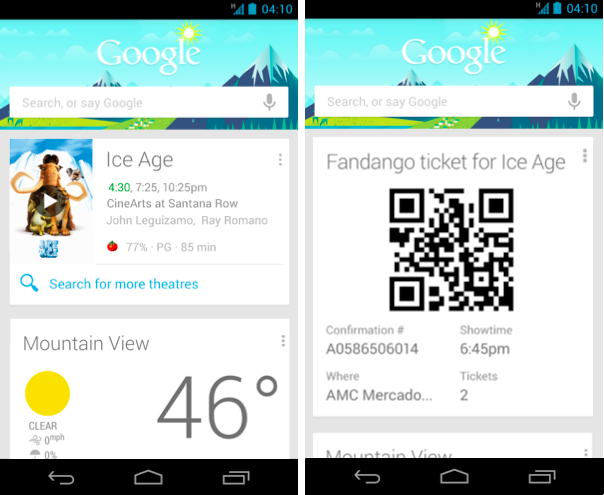
Going to the movies? Movie cards now include the latest ratings from Rotten Tomatoes, so you can pick the right movie. Purchase your tickets through Fandango, and Google Now will remind you when you need to leave for the theater, and pull up your tickets once you arrive.


In the market for a new home? Google Now can provide you with nearby real estate listings from Zillow. Plus, when you are checking out that remodeled kitchen at the open house, Now will automatically pull up more information about the listing.


Of course, all of this information is most helpful when it’s front and center and ready when you are. The new Google Now widget brings all your important Now cards to your home or lock screen, so you don’t even have to open the app.


When Google Now first launched last summer, we promised it was just the beginning, and it would continue to get better at delivering you more of the information you need, before you even ask. This is the fourth update since launch, and we’re just getting started!


To try out these new cards, get the latest version of the Google Search app for Android, available on Google Play for devices running Android 4.1 and above.

Posted by Baris Gultekin, Product Management Director

Introducing Magazines on Google Play for the UK

Following hot on the heels of the recent launch of music on Google Play in the UK, we’re pleased to announce that from today, you’ll also be able to buy digital versions of your favourite magazines for reading on the go.

Popular titles from some of the world’s leading publishers such as Condé Nast UK, Dennis Publishing, Future, Haymarket, Hearst UK, Immediate Media and IPC Media are now available for purchase on your Android phone or tablet.

Get in shape with Men’s Fitness, cook up a storm with olive, work off all that turkey and Christmas pudding with Slimming World, catch up on the latest must-have gadgets with T3 and read a preview of The Hobbit in this month’s edition of Total Film.

You can stay abreast of the week’s key events with Hello!, New Statesman and The Spectator and keep on top of the latest lifestyle news with Cosmopolitan, Glamour and Tatler. Petrolheads can pick out some new wheels with What Car?, while domestic goddesses can take their inspiration from Good Housekeeping.

Browse the Play Store to find your favourite magazines, discover new titles with a 30-day free trial, buy single issues or purchase a money-saving monthly or annual subscription to leading titles such as Elle, Harper’s Bazaar, Vogue and Wired. New Nexus devices even come pre-loaded with free issues of Men’s Fitness, .net and Vogue to get you started.

All your latest issues will be instantly available on your Android tablet or phone, or online, using our web reader, and organised in your collection in the cloud. You can flip through your magazine carousel to quickly decide what to read next or simply search for a specific title in your magazine collection.


Magazines are available today to enjoy on the sofa or on the go via your Android devices and on play.google.com, so please take a look.

Posted by Avi Yaar, Product Manager, Google Play